Cartoon Network App
- 3.4
- Rating
- 10.00M
- Installs
- Free
- Price

 Analysis by App-foxy
Cartoon Network App is the kind of streaming companion I would open when I want familiar animated shows without searching through a general video service. Developed by Cartoon Network, it sits in the video players and editors category, although its real purpose is much narrower: giving fans a focused place to watch episodes from Cartoon Network and Cartoonito. I found that focus useful, especially for families who do not want to sort through a huge catalogue before finding something suitable.
The app is free, carries an Everyone 10+ content rating, and supports devices running Android 6.0 or later. Its public listing shows more than ten million installs, with an average score of 3.5 from roughly one hundred thirty-five thousand ratings and about fifty-one thousand written reviews. Those figures suggest a large audience but also a mixed experience, which matches my impression: the central idea is appealing, while the practical experience depends heavily on how easily a child or parent can reach the desired programme.
Finding shows without making the screen do too much
My first impression is that the app works best when the viewer already knows what they want to watch. A child asking for a particular Cartoon Network character or a parent looking for something from Cartoonito can approach it with a clear goal. That is more comfortable than opening a broad streaming service filled with unrelated recommendations, mature choices, and competing brands.
You May Also Like

 Blood Strike: 2.5 Anniversary
Blood Strike’s Loadouts Turn Every Drop Into a Tactical Gamble
A close look at Blood Strike’s custom loadouts: how fast access to signature weapons reshapes its battle royale rhythm, rewards preparation, and narrows the gap between fights.

 Pandora - Music & Podcasts
Pandora’s Music Is Easy to Start, but Harder to Recover
Pandora’s strength is its low-effort path from a seed to a station. Its weak spot is how much confidence it asks you to place in connection, setup, and quiet recovery.

 8 Ball Pool
 Is Built on Rivalries, Rematches, and Routine
A close look at the rivalries, rematches, shared routines, and unanswered safety questions that turn a quick pool match into a persistent mobile community.

 Samsung Music
’s Quiet Strength Is Playing What You Already Own
Its reach comes less from spectacle than from dependable access to a personal library. That simplicity is both the app’s strongest retention engine and its ceiling.

 AccuWeather: Weather Radar
AccuWeather Review: A Quick, Clear Forecast for Everyday Decisions
For everyday plans, the best forecast is the one you can understand quickly. AccuWeather makes rain timing, radar, and local conditions easy to act on, with a few trade-offs.

 Hill Climb Racing
Why Hill Climb Racing Still Turns Crashes Into One More Run
A tiny car, a bumpy hill and one more upgrade: Hill Climb Racing keeps resurfacing because its simple chaos makes every near-miss feel personal.
More From Our News Desk



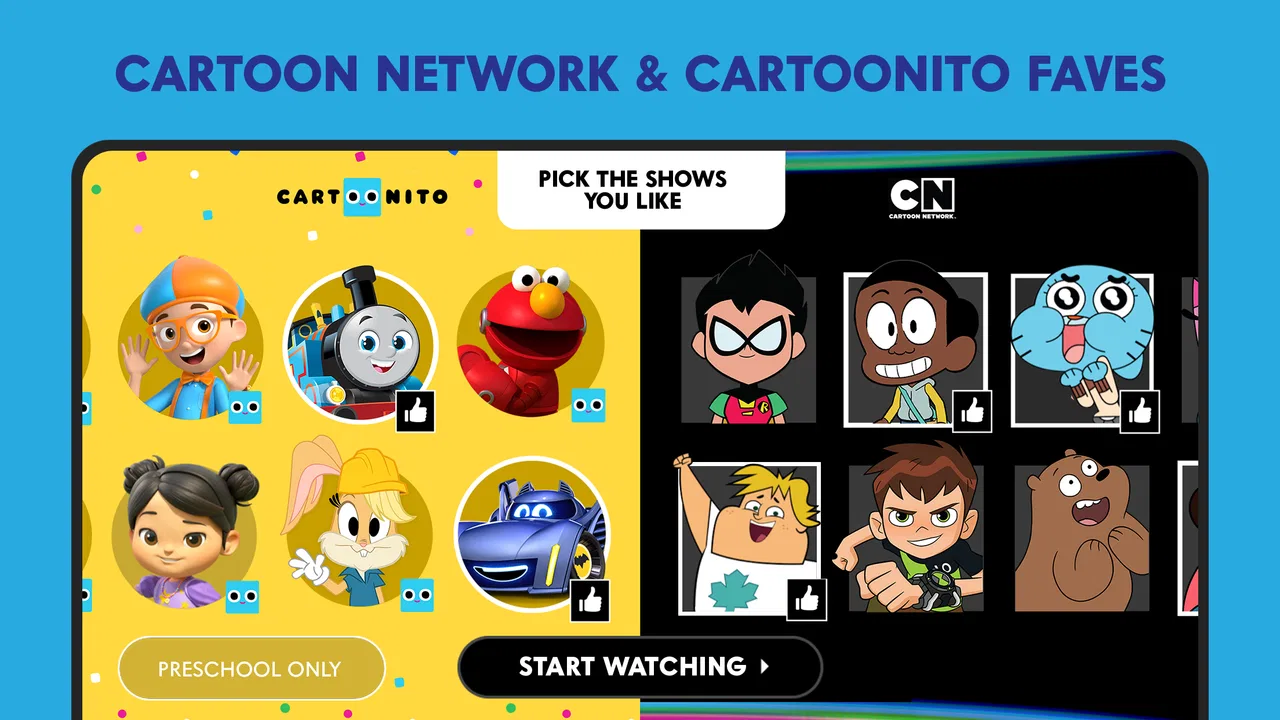
The focused catalogue also gives the app a recognisable visual identity. Familiar programme artwork can help a young viewer identify a favourite more quickly than a text-heavy list. For someone who reads slowly, is still learning to read, or simply makes choices visually, this kind of recognition can be more useful than a long written menu.
At the same time, image-led navigation is not automatically accessible for everyone. A child with limited vision may find small artwork or low-contrast text difficult to distinguish, while a parent trying to choose something quickly may prefer clearer labels and fewer decorative elements. I would not treat the colourful presentation as a universal solution. It helps with recognition, but it does not replace readable text and predictable navigation.
I recommend giving the app a short setup test before handing over the device. Open it in the same orientation and lighting your child normally uses, locate a programme, start an episode, pause it, and return to the browsing screen. This simple routine reveals more than the download page: it shows whether the child can repeat the process independently or will need an adult nearby.
For shared family use, I found it helpful to decide in advance which shows are acceptable and then let the child choose among those familiar options. That approach reduces the need to browse endlessly and avoids turning the app into a negotiation every time. It is a small workflow, but it makes the focused catalogue work better for children who become overwhelmed by too many choices.
Readable enough for quick choices, but not equally comfortable for every viewer
The app’s strongest readability advantage is its subject matter. Cartoon Network and Cartoonito are immediately recognisable names, and the programme imagery does much of the communication. A child who cannot yet read every title may still recognise a favourite series. This is particularly useful for independent selection, where the child knows the character but not necessarily the full written name.
However, recognition can become a weakness when several thumbnails look similar or when the viewer needs to distinguish episodes rather than series. Parents may have to read the smaller text or explain the choices. If your child relies on enlarged text, strong contrast, a screen reader, or very consistent labels, I would test the app personally instead of assuming that a child-friendly brand automatically means an accessible interface.
One practical tip is to use the device’s own display settings before judging the app. Larger system text, increased contrast, or magnification may improve surrounding controls, but they can also make a compact interface feel crowded. I would check the whole path from opening the app to playing a show, because an adjustment that helps a title may make buttons harder to reach.
The app is also easier to explain when adults use the same words every time: “open the show,” “choose the picture,” “press play,” and “pause here.” Consistent language matters for children with cognitive or communication differences. The app does not need to provide every support itself for a family to build a reliable routine around it, but the routine requires an adult to establish it.
Touch, sound, and movement in everyday viewing
For motor access, the main task is straightforward: browse, select, and control video playback. That simplicity is a positive compared with apps that demand constant swiping, typing, or complicated account management. A child with limited fine-motor control may manage the basic flow if the interactive areas are easy to hit and the device is positioned securely.
Still, touch control can be demanding for viewers with tremors, reduced precision, or difficulty maintaining contact with the screen. A small accidental tap can change the selection or interrupt viewing. I would place the device on a stand rather than expecting a child to hold it throughout an episode. A stable screen reduces both fatigue and unintended touches.
For children who are sensitive to sound, animated programmes can be a challenging viewing choice even when the navigation itself feels manageable. Fast dialogue, sudden effects, and energetic music are part of the viewing experience, not merely interface details. I would begin with a familiar episode at a low volume and watch for signs of discomfort. Headphones may help some viewers, but they can be unsuitable for children who need to hear people around them.
Visual motion deserves the same attention. A child who enjoys cartoons in general may still find rapid cuts, bright scenes, or busy action tiring. The safest approach is observation rather than assumption: use a short viewing period first, keep the room comfortably lit, and allow the child to pause or stop without pressure. The app’s value is reduced if the child can reach a show but cannot comfortably remain with it.
For children who communicate without speech, the app can still fit into a choice-making routine if an adult presents a small number of known programme options. Showing two or three choices on the screen and accepting a point, gesture, or eye movement can make the selection meaningful. This is not a special feature of the app; it is a practical way to use its visual catalogue with existing communication habits.
Where the app fits: home, travel, and shared devices
At home, I see the app working best as a predictable destination rather than a complete family media system. A parent can open it before a child begins watching, confirm the intended programme, and leave the device in a stable position. This is especially useful during a quiet transition, such as getting ready for bed or taking a short break after school, when a familiar show can provide structure.
On a shared family tablet, the experience depends on preparation. Different children may have different tolerance for noise, motion, or independence, so the same catalogue will not suit every viewer in the same way. I would create a simple household rule about volume and supervision, then keep the device’s general accessibility settings consistent rather than changing them for every session.
Travel is a more complicated case. A focused cartoon app sounds ideal for waiting rooms or journeys, but the real benefit depends on whether the viewer can use it comfortably in a moving or crowded environment. Glare, unstable hand position, background noise, and limited space can all make touch controls harder. I would test the app in a similar setting before relying on it as the only activity during a trip.
The app is also not the same as a general-purpose video player. If your goal is to play your own downloaded files, organise a personal library, or adjust media in an editing workflow, a dedicated local player or editor is a better choice. Cartoon Network App is for accessing this particular entertainment universe, not for managing every kind of video.
Likewise, a broad streaming service may be preferable for a household that needs one place for documentaries, films, live content, and several children’s channels. The trade-off is that broader choice often means more searching and more decisions. I would choose this app when the priority is familiar Cartoon Network or Cartoonito content, not when the priority is catalogue breadth.
Questions I would settle before installing it
The first question is whether it costs anything to download. The app is free, which makes it easy to try without committing money. Free access does not automatically make it the best fit for every family, though; the important test is whether the available viewing path suits your household’s expectations and the child’s abilities.
The second question is whether it is suitable for a young child. Its content rating is Everyone 10+, so I would still make the final decision based on the individual child, the specific programme, and the family’s supervision preferences. A rating is a useful starting point, not a substitute for knowing how a child reacts to particular characters, themes, or levels of action.
Another common concern is device compatibility. The app supports Android 6.0 and newer, so an older phone or tablet may fall outside that requirement. Before planning a family viewing routine, I would check the operating system on the exact device the child will use. Compatibility is especially important with hand-me-down tablets, where the hardware may still function for other tasks but run an older system.
People also ask whether a child can use it alone. My answer is: sometimes, but do not assume it. A child who recognises the programme artwork and has practised the play-and-pause sequence may manage a familiar route. A child who needs larger controls, has difficulty with touch accuracy, or becomes distressed by unexpected changes may need an adult to start the episode and remain close.
Finally, consider whether the app supports the viewing context you actually have. If you need a calm, repeatable way to reach known Cartoon Network or Cartoonito shows, it has a clear role. If you need strong control over personal media, extensive accessibility customisation, or a single platform covering many unrelated services, another video solution may serve you better.
The barriers that still matter
The mixed average rating is worth taking seriously. A focused brand and a free download do not guarantee a smooth experience on every device or for every family. Streaming apps can feel very different depending on screen size, connection quality, operating system behaviour, and how much browsing the viewer needs to do. I would treat the first session as a trial, not as a commitment to replace every other viewing option.
Navigation can also become a barrier when a child needs more than visual recognition. If the interface relies on small controls, changing layouts, or dense episode choices, independent use may be difficult. The app may be perfectly enjoyable with an adult guiding the first steps, yet less suitable for a child who needs to operate it without help.
There is a difference between being easy for children to recognise and being accessible across different abilities. Cartoon characters and bright artwork can invite engagement, but they do not tell me whether every control is easy to see, hear, reach, or understand. Families using assistive technology or specific accessibility routines should test the actual device and viewing path rather than relying on the brand’s child-friendly appearance.
Supervision is another practical limitation. Even with a family-oriented catalogue, parents may want to choose programmes in advance, control the length of a session, or help a child stop watching. I would keep the device within reach of an adult when the viewer is very young or has difficulty communicating discomfort. That is not a criticism of the concept; it is a realistic part of using video with children.
My inclusive verdict
I see Cartoon Network App as a useful, specialised option for families who want a direct route to familiar animated entertainment. Its free price, focused identity, and visual programme recognition can make choosing a show less intimidating than browsing a general service. For children who respond well to character images and can manage basic touch controls, it may support a pleasant degree of independence.
My recommendation is more cautious for viewers with low vision, motor difficulties, sensory sensitivities, or a strong need for predictable assistive access. The app can be included in a supportive routine, but I would not assume that its branding alone solves readability, touch, sound, or motion concerns. Test it with the child, adjust the device, and keep an alternative available.
After using it, my honest view is that Cartoon Network App succeeds when the need is narrow and clear: open a familiar Cartoon Network or Cartoonito destination and start watching. It is less convincing as an all-purpose video tool or as a completely independent environment for every child. I would install it for a fan who values recognisable shows and simple choices, while choosing a broader or more customisable player when accessibility controls and media flexibility matter more than the Cartoon Network catalogue.
For families deciding today, the best test is practical: check the Android version, open the app with the intended display settings, let the viewer choose a known show, and observe the full session rather than only the first screen. If that routine feels calm and repeatable, the app has earned a place in your household. If reaching, reading, hearing, or stopping the content creates friction, another viewing option will be the kinder choice.
FAQs for Cartoon Network App
01What content is available on the Cartoon Network App?
The Cartoon Network App offers a wide variety of content, including full episodes, clips, and exclusive content from popular shows like "Adventure Time," "The Amazing World of Gumball," and "Teen Titans Go!". The app frequently updates its library, ensuring that users always have access to the latest episodes and special features.
02Is the Cartoon Network App free to use?
The Cartoon Network App is free to download and use, but it may require a cable provider login to access some of the content. While many clips and episodes are available without login, full access to the complete library, including live TV, may require a subscription through a participating cable provider.
03On which devices can I use the Cartoon Network App?
The Cartoon Network App is available on both Android and iOS devices, including smartphones and tablets. It is compatible with major operating systems and can be downloaded from Google Play Store and the Apple App Store. Additionally, it supports streaming to larger screens through Chromecast or AirPlay.
04Does the Cartoon Network App have parental controls?
Yes, the Cartoon Network App includes parental controls to ensure a safe viewing experience for children. Parents can customize the settings to restrict certain content and manage viewing times. This feature allows parents to monitor and control what their children watch, providing peace of mind.
05How can I troubleshoot issues with the Cartoon Network App?
If you encounter issues with the Cartoon Network App, try restarting the app or your device. Ensure you have a stable internet connection, as streaming quality relies on bandwidth. If problems persist, check for app updates or contact Cartoon Network support for further assistance. The app's settings menu also offers troubleshooting tips.
Pros
- Extensive library of shows available.
- User-friendly interface for easy navigation.
- Offers offline viewing for select content.
- Parental controls for safe kid viewing.
- Regular updates with new episodes.
Cons
- Requires subscription for premium content.
- Ads can be intrusive during free viewing.
- Limited availability in some regions.
- Streaming quality varies with connection.
- In-app purchases can be pricey.

Cartoon Network App
Gallery